Infrastructure Tools

Tools & Tool Mentors

NUP recommended tools for infrastructure, containers, and deployment

Infrastructure tools enable teams to manage cloud resources, containerize applications, and automate deployments. This guide covers Infrastructure as Code (IaC), container orchestration, and environment management.

Infrastructure as Code (IaC)

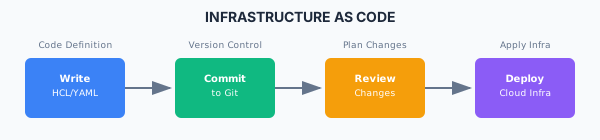
Infrastructure as Code

IaC Tool Comparison

ToolProviderLanguageBest For
TerraformHashiCorpHCLMulti-cloud
PulumiPulumiTypeScript, Python, GoDeveloper-friendly
CloudFormationAWSJSON/YAMLAWS-native
ARM TemplatesAzureJSONAzure-native
CDKAWSTypeScript, PythonProgrammatic AWS
BicepAzureBicepModern Azure

Terraform Example

# main.tf
terraform {
  required_providers {
    aws = {
      source  = "hashicorp/aws"
      version = "~> 5.0"
    }
  }

  backend "s3" {
    bucket = "my-terraform-state"
    key    = "prod/terraform.tfstate"
    region = "us-east-1"
  }
}

provider "aws" {
  region = var.aws_region
}

# VPC
module "vpc" {
  source  = "terraform-aws-modules/vpc/aws"
  version = "5.0.0"

  name = "my-vpc"
  cidr = "10.0.0.0/16"

  azs             = ["us-east-1a", "us-east-1b", "us-east-1c"]
  private_subnets = ["10.0.1.0/24", "10.0.2.0/24", "10.0.3.0/24"]
  public_subnets  = ["10.0.101.0/24", "10.0.102.0/24", "10.0.103.0/24"]

  enable_nat_gateway = true
  single_nat_gateway = true

  tags = {
    Environment = var.environment
    Project     = var.project_name
  }
}

# EKS Cluster
module "eks" {
  source  = "terraform-aws-modules/eks/aws"
  version = "19.0.0"

  cluster_name    = "${var.project_name}-cluster"
  cluster_version = "1.28"

  vpc_id     = module.vpc.vpc_id
  subnet_ids = module.vpc.private_subnets

  eks_managed_node_groups = {
    default = {
      min_size     = 2
      max_size     = 10
      desired_size = 3

      instance_types = ["t3.medium"]
    }
  }
}

Pulumi Example (TypeScript)

import * as pulumi from "@pulumi/pulumi";
import * as aws from "@pulumi/aws";
import * as awsx from "@pulumi/awsx";

// Create a VPC
const vpc = new awsx.ec2.Vpc("my-vpc", {
  cidrBlock: "10.0.0.0/16",
  numberOfAvailabilityZones: 3,
  natGateways: {
    strategy: "Single",
  },
});

// Create an ECS cluster
const cluster = new aws.ecs.Cluster("my-cluster");

// Create a load-balanced Fargate service
const service = new awsx.ecs.FargateService("my-service", {
  cluster: cluster.arn,
  networkConfiguration: {
    subnets: vpc.privateSubnetIds,
    securityGroups: [],
  },
  desiredCount: 2,
  taskDefinitionArgs: {
    container: {
      name: "app",
      image: "nginx:latest",
      cpu: 256,
      memory: 512,
      portMappings: [
        {
          containerPort: 80,
          protocol: "tcp",
        },
      ],
    },
  },
});

export const url = service.loadBalancer.loadBalancer.dnsName;

Container Tools

Container Runtimes

ToolTypeUse Case
DockerRuntimeStandard containerization
containerdRuntimeKubernetes default runtime
PodmanRuntimeDaemonless containers
CRI-ORuntimeKubernetes-native

Container Orchestration

ToolTypeBest For
KubernetesOrchestrationProduction workloads
Docker ComposeOrchestrationLocal development
Docker SwarmOrchestrationSimple clustering
AWS ECSManagedAWS-native containers
Azure Container AppsServerlessServerless containers

Dockerfile Best Practices

# Use multi-stage builds
FROM node:20-alpine AS builder
WORKDIR /app
COPY package*.json ./
RUN npm ci --only=production

FROM node:20-alpine AS runner
WORKDIR /app

# Don't run as root
RUN addgroup --system --gid 1001 nodejs
RUN adduser --system --uid 1001 nextjs

# Copy only necessary files
COPY --from=builder /app/node_modules ./node_modules
COPY --chown=nextjs:nodejs . .

USER nextjs
EXPOSE 3000
ENV PORT 3000

CMD ["node", "server.js"]

Docker Compose Example

# docker-compose.yml
version: '3.8'

services:
  app:
    build:
      context: .
      dockerfile: Dockerfile
    ports:
      - "3000:3000"
    environment:
      - DATABASE_URL=postgresql://postgres:password@db:5432/myapp
      - REDIS_URL=redis://redis:6379
    depends_on:
      db:
        condition: service_healthy
      redis:
        condition: service_started
    healthcheck:
      test: ["CMD", "curl", "-f", "http://localhost:3000/health"]
      interval: 30s
      timeout: 10s
      retries: 3

  db:
    image: postgres:15-alpine
    environment:
      - POSTGRES_USER=postgres
      - POSTGRES_PASSWORD=password
      - POSTGRES_DB=myapp
    volumes:
      - postgres_data:/var/lib/postgresql/data
    healthcheck:
      test: ["CMD-SHELL", "pg_isready -U postgres"]
      interval: 5s
      timeout: 5s
      retries: 5

  redis:
    image: redis:7-alpine
    volumes:
      - redis_data:/data

volumes:
  postgres_data:
  redis_data:

Kubernetes Tools

Kubernetes Ecosystem

CategoryTools
Package ManagementHelm, Kustomize
GitOpsArgoCD, Flux
Service MeshIstio, Linkerd
Ingressnginx-ingress, Traefik
MonitoringPrometheus, Grafana
LoggingFluentd, Loki
SecretsExternal Secrets, Sealed Secrets

Helm Chart Example

# Chart.yaml
apiVersion: v2
name: myapp
version: 1.0.0
appVersion: "1.0.0"

# values.yaml
replicaCount: 3

image:
  repository: myapp
  tag: latest
  pullPolicy: IfNotPresent

service:
  type: ClusterIP
  port: 80

ingress:
  enabled: true
  hosts:
    - host: myapp.example.com
      paths:
        - path: /
          pathType: Prefix

resources:
  limits:
    cpu: 500m
    memory: 512Mi
  requests:
    cpu: 100m
    memory: 128Mi

autoscaling:
  enabled: true
  minReplicas: 2
  maxReplicas: 10
  targetCPUUtilizationPercentage: 80

Kubernetes Manifest

# deployment.yaml
apiVersion: apps/v1
kind: Deployment
metadata:
  name: myapp
  labels:
    app: myapp
spec:
  replicas: 3
  selector:
    matchLabels:
      app: myapp
  template:
    metadata:
      labels:
        app: myapp
    spec:
      containers:
        - name: myapp
          image: myapp:1.0.0
          ports:
            - containerPort: 3000
          env:
            - name: DATABASE_URL
              valueFrom:
                secretKeyRef:
                  name: myapp-secrets
                  key: database-url
          resources:
            limits:
              cpu: "500m"
              memory: "512Mi"
            requests:
              cpu: "100m"
              memory: "128Mi"
          livenessProbe:
            httpGet:
              path: /health
              port: 3000
            initialDelaySeconds: 30
            periodSeconds: 10
          readinessProbe:
            httpGet:
              path: /ready
              port: 3000
            initialDelaySeconds: 5
            periodSeconds: 5

Environment Management

Configuration Management

ToolTypeUse Case
AnsibleConfig ManagementServer configuration
ChefConfig ManagementInfrastructure automation
PuppetConfig ManagementEnterprise config
SaltStackConfig ManagementRemote execution

Secrets Management

ToolProviderFeatures
HashiCorp VaultHashiCorpDynamic secrets, encryption
AWS Secrets ManagerAWSAWS integration
Azure Key VaultAzureAzure integration
GCP Secret ManagerGoogleGCP integration
1Password Secrets1PasswordDeveloper-friendly

Vault Example

# vault policy
path "secret/data/myapp/*" {
  capabilities = ["read"]
}

path "database/creds/myapp" {
  capabilities = ["read"]
}
# Kubernetes with Vault injection
apiVersion: v1
kind: Pod
metadata:
  annotations:
    vault.hashicorp.com/agent-inject: "true"
    vault.hashicorp.com/role: "myapp"
    vault.hashicorp.com/agent-inject-secret-config: "secret/data/myapp/config"
spec:
  containers:
    - name: myapp
      image: myapp:1.0.0

Cloud Provider Tools

AWS

ServicePurpose
EC2Virtual machines
ECS/EKSContainer orchestration
LambdaServerless functions
RDSManaged databases
S3Object storage
CloudWatchMonitoring

Azure

ServicePurpose
VMsVirtual machines
AKSKubernetes
FunctionsServerless
Azure SQLManaged databases
Blob StorageObject storage
MonitorMonitoring

GCP

ServicePurpose
Compute EngineVirtual machines
GKEKubernetes
Cloud FunctionsServerless
Cloud SQLManaged databases
Cloud StorageObject storage
Cloud MonitoringMonitoring

Compliance

This section fulfills ISO 13485 requirements for infrastructure management (6.3), production equipment (7.5.1), and validation (7.5.2), and ISO 27001 requirements for infrastructure security (A.8.20), cloud security (A.5.23), and configuration management (A.8.9).

View full compliance matrix

Sign in or sign up

Enter your work email to receive a temporary sign-in link.

By continuing, you agree to our Terms of Service and Privacy Policy.