
A consistent branching strategy ensures teams can collaborate effectively, maintain code quality, and deliver releases predictably. This practice defines Git branching workflows for NUP projects.
Git Flow Model
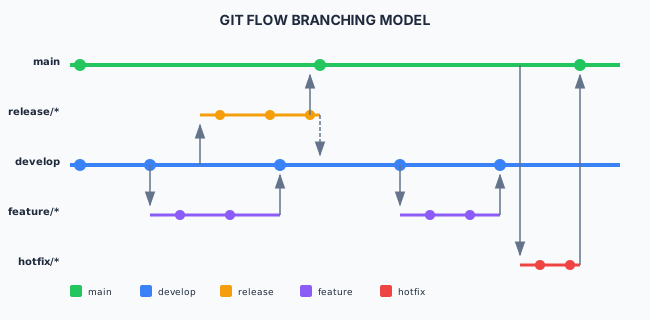
Git Flow is the recommended branching strategy for projects with scheduled releases and multiple environments.
Branch Types
Long-Lived Branches
| Branch | Purpose | Protected |
|---|---|---|
| main | Production-ready code | Yes |
| develop | Integration branch for features | Yes |
Short-Lived Branches
| Branch | Purpose | Naming Convention |
|---|---|---|
| feature/ | New features | feature/TICKET-123-description |
| bugfix/ | Bug fixes | bugfix/TICKET-456-description |
| release/ | Release preparation | release/1.2.0 |
| hotfix/ | Production fixes | hotfix/1.2.1 |
Branch Naming Conventions
Standard Format
<type>/<ticket-id>-<short-description>

Examples:
feature/PROJ-123-user-authentication
bugfix/PROJ-456-fix-login-timeout
release/1.2.0
hotfix/1.2.1-security-patch
Naming Rules
- Use lowercase
- Use hyphens for word separation
- Include ticket ID when applicable
- Keep descriptions brief (2-4 words)
Workflow: Feature Development
1. Create Feature Branch
# Ensure develop is up to date
git checkout develop
git pull origin develop

# Create feature branch
git checkout -b feature/PROJ-123-user-authentication
2. Develop and Commit
# Make changes and commit
git add .
git commit -m "feat(auth): implement user login form

- Add login form component
- Add validation logic
- Add unit tests

Refs: PROJ-123"
3. Keep Branch Updated
# Regularly sync with develop
git fetch origin
git rebase origin/develop
4. Create Pull Request
# Push to remote
git push -u origin feature/PROJ-123-user-authentication

# Create PR via GitHub/GitLab CLI or web interface
gh pr create --base develop --title "feat(auth): user authentication" --body "..."
5. Merge After Review
# After approval, merge to develop
# (Usually done via PR interface)
git checkout develop
git merge --no-ff feature/PROJ-123-user-authentication
git push origin develop

# Delete feature branch
git branch -d feature/PROJ-123-user-authentication
git push origin --delete feature/PROJ-123-user-authentication
Workflow: Release
1. Create Release Branch
git checkout develop
git pull origin develop

# Create release branch
git checkout -b release/1.2.0
2. Prepare Release
# Update version numbers
npm version 1.2.0 --no-git-tag-version

# Update changelog
# Edit CHANGELOG.md

git add .
git commit -m "chore: prepare release 1.2.0"
3. Fix Release Issues
# Bug fixes go directly to release branch
git commit -m "fix: correct validation error in release"
4. Complete Release
# Merge to main
git checkout main
git merge --no-ff release/1.2.0
git tag -a v1.2.0 -m "Release version 1.2.0"
git push origin main --tags

# Merge back to develop
git checkout develop
git merge --no-ff release/1.2.0
git push origin develop

# Delete release branch
git branch -d release/1.2.0
git push origin --delete release/1.2.0
Workflow: Hotfix
1. Create Hotfix Branch
# Hotfixes branch from main
git checkout main
git pull origin main

git checkout -b hotfix/1.2.1
2. Implement Fix
# Make fix
git add .
git commit -m "fix: patch security vulnerability CVE-2024-XXXX"

# Update version
npm version patch --no-git-tag-version
git add .
git commit -m "chore: bump version to 1.2.1"
3. Complete Hotfix
# Merge to main
git checkout main
git merge --no-ff hotfix/1.2.1
git tag -a v1.2.1 -m "Hotfix 1.2.1"
git push origin main --tags

# Merge to develop (or release branch if one exists)
git checkout develop
git merge --no-ff hotfix/1.2.1
git push origin develop

# Delete hotfix branch
git branch -d hotfix/1.2.1
Alternative: GitHub Flow
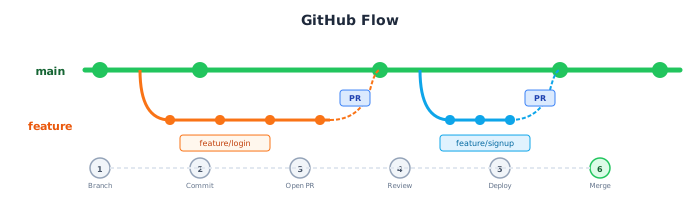
For projects with continuous deployment, GitHub Flow provides a simpler model.
GitHub Flow Rules
mainis always deployable- Create descriptive branches from
main - Commit to branches and push regularly
- Open PR when ready for review
- Merge to
mainafter approval - Deploy immediately after merge
Branch Protection Rules
Recommended Protection for main
# GitHub branch protection settings
main:
  required_reviews: 2
  require_status_checks: true
  require_up_to_date: true
  required_checks:
    - build
    - test
    - lint
    - security-scan
  enforce_admins: true
  allow_force_pushes: false
  allow_deletions: false
Recommended Protection for develop
develop:
  required_reviews: 1
  require_status_checks: true
  required_checks:
    - build
    - test
    - lint
  enforce_admins: false
Git Commands Reference
Daily Commands
# Start new work
git checkout develop
git pull
git checkout -b feature/PROJ-123-feature-name

# Save work
git add .
git commit -m "feat: description"

# Update branch
git fetch origin
git rebase origin/develop

# Push changes
git push -u origin feature/PROJ-123-feature-name
Release Commands
# Create release
git checkout -b release/1.2.0 develop

# Tag release
git tag -a v1.2.0 -m "Release version 1.2.0"
git push --tags
Utility Commands
# View branches
git branch -a

# Delete local branch
git branch -d branch-name

# Delete remote branch
git push origin --delete branch-name

# Clean up merged branches
git branch --merged | grep -v "main\|develop" | xargs git branch -d
Git Flow Tools
Git Flow Extension
# Install git-flow
# macOS
brew install git-flow

# Ubuntu
apt-get install git-flow

# Initialize
git flow init -d

# Feature workflow
git flow feature start my-feature
git flow feature finish my-feature

# Release workflow
git flow release start 1.2.0
git flow release finish 1.2.0

# Hotfix workflow
git flow hotfix start 1.2.1
git flow hotfix finish 1.2.1
Related Resources
- Version Management - Versioning strategy
- Code Reviews - PR review process
- Build & Integration - CI/CD integration
Compliance
This section fulfills ISO 13485 requirements for design and development control (7.3.7) and configuration management (4.2.3), and ISO 27001 requirements for change management (A.8.32), secure development environment (A.8.31), and configuration management (A.8.9).