On this page
Build and integration tools automate the software delivery process, ensuring consistent, repeatable builds and deployments. This guide covers CI/CD platforms, build tools, and artifact management.
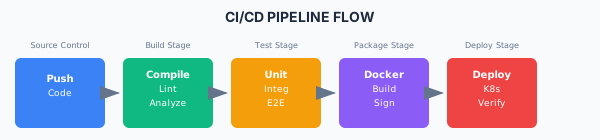
CI/CD Pipeline Flow JavaScript/TypeScript
// package.json scripts
{
  "scripts": {
    "build": "vite build",
    "build:prod": "NODE_ENV=production vite build",
    "lint": "eslint src --ext .ts,.tsx",
    "type-check": "tsc --noEmit",
    "test": "vitest",
    "test:coverage": "vitest --coverage"
  }
}
Java
<!-- Maven pom.xml -->
<build>
    <plugins>
        <plugin>
            <groupId>org.apache.maven.plugins</groupId>
            <artifactId>maven-compiler-plugin</artifactId>
            <version>3.11.0</version>
            <configuration>
                <source>17</source>
                <target>17</target>
            </configuration>
        </plugin>
        <plugin>
            <groupId>org.jacoco</groupId>
            <artifactId>jacoco-maven-plugin</artifactId>
            <version>0.8.10</version>
        </plugin>
    </plugins>
</build>
.NET
# .NET build commands
dotnet restore
dotnet build --configuration Release
dotnet test --collect:"XPlat Code Coverage"
dotnet publish -c Release -o ./publish
Python
# pyproject.toml with Poetry
[tool.poetry]
name = "myapp"
version = "1.0.0"

[tool.poetry.dependencies]
python = "^3.11"
fastapi = "^0.100.0"

[tool.poetry.group.dev.dependencies]
pytest = "^7.4.0"
ruff = "^0.0.280"

[build-system]
requires = ["poetry-core"]
build-backend = "poetry.core.masonry.api"
Artifact Management
Docker Registry Options
CI/CD Pipeline Examples
GitHub Actions
name: Build and Deploy

on:
  push:
    branches: [main]
  pull_request:
    branches: [main]

env:
  REGISTRY: ghcr.io
  IMAGE_NAME: ${{ github.repository }}

jobs:
  build:
    runs-on: ubuntu-latest
    permissions:
      contents: read
      packages: write

    steps:
      - uses: actions/checkout@v4

      - name: Setup Node.js
        uses: actions/setup-node@v4
        with:
          node-version: '20'
          cache: 'npm'

      - name: Install dependencies
        run: npm ci

      - name: Lint
        run: npm run lint

      - name: Type check
        run: npm run type-check

      - name: Test
        run: npm run test:coverage

      - name: Build
        run: npm run build

      - name: Build Docker image
        uses: docker/build-push-action@v5
        with:
          context: .
          push: ${{ github.event_name != 'pull_request' }}
          tags: ${{ env.REGISTRY }}/${{ env.IMAGE_NAME }}:${{ github.sha }}

  deploy:
    needs: build
    if: github.ref == 'refs/heads/main'
    runs-on: ubuntu-latest

    steps:
      - name: Deploy to Kubernetes
        run: |
          kubectl set image deployment/myapp \
            myapp=${{ env.REGISTRY }}/${{ env.IMAGE_NAME }}:${{ github.sha }}
Jenkins Pipeline
pipeline {
    agent any

    environment {
        REGISTRY = 'registry.example.com'
        IMAGE = 'myapp'
    }

    stages {
        stage('Build') {
            steps {
                sh 'npm ci'
                sh 'npm run build'
            }
        }

        stage('Test') {
            parallel {
                stage('Unit Tests') {
                    steps {
                        sh 'npm run test:unit'
                    }
                }
                stage('Integration Tests') {
                    steps {
                        sh 'npm run test:integration'
                    }
                }
            }
        }

        stage('Security Scan') {
            steps {
                sh 'npm audit --audit-level high'
                sh 'trivy image ${REGISTRY}/${IMAGE}:${BUILD_NUMBER}'
            }
        }

        stage('Deploy') {
            when {
                branch 'main'
            }
            steps {
                sh 'kubectl apply -f k8s/'
            }
        }
    }

    post {
        always {
            junit 'test-results/*.xml'
            publishCoverage adapters: [coberturaAdapter('coverage/*.xml')]
        }
    }
}
Azure DevOps Pipeline
trigger:
  - main

pool:
  vmImage: 'ubuntu-latest'

variables:
  buildConfiguration: 'Release'

stages:
  - stage: Build
    jobs:
      - job: Build
        steps:
          - task: NodeTool@0
            inputs:
              versionSpec: '20.x'

          - script: npm ci
            displayName: 'Install dependencies'

          - script: npm run build
            displayName: 'Build'

          - task: PublishBuildArtifacts@1
            inputs:
              pathToPublish: 'dist'
              artifactName: 'build'

  - stage: Test
    jobs:
      - job: Test
        steps:
          - script: npm run test:coverage
            displayName: 'Run tests'

          - task: PublishTestResults@2
            inputs:
              testResultsFormat: 'JUnit'
              testResultsFiles: '**/junit.xml'

          - task: PublishCodeCoverageResults@1
            inputs:
              codeCoverageTool: 'Cobertura'
              summaryFileLocation: '**/coverage/cobertura.xml'

  - stage: Deploy
    condition: and(succeeded(), eq(variables['Build.SourceBranch'], 'refs/heads/main'))
    jobs:
      - deployment: Deploy
        environment: 'production'
        strategy:
          runOnce:
            deploy:
              steps:
                - script: echo "Deploying to production"
Version Management
Semantic Versioning
MAJOR.MINOR.PATCH.BUILD

Examples:
1.0.0       - Initial release
1.0.1       - Patch (bug fix)
1.1.0       - Minor (new feature, backwards compatible)
2.0.0       - Major (breaking changes)
1.0.0-beta  - Pre-release
1.0.0+build.123 - Build metadata
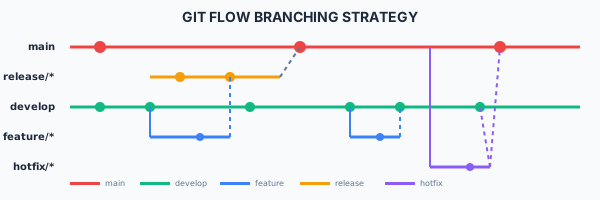
Git Flow Branching
Git Flow Branching Strategy Compliance
This section fulfills ISO 13485 requirements for production control (7.5.1), traceability (7.5.3), and validation (7.5.2), and ISO 27001 requirements for change management (A.8.32), secure development lifecycle (A.8.25), and configuration management (A.8.9).
View full compliance matrix